
Link My Books: check the path from sales channel to books
Link My Books automates parts of ecommerce bookkeeping between supported sales channels and accounting software such as Xero or QuickBooks. It does not supply a human bookkeeper. Check your channel, accounting product and region before comparing paid plans.
MailboxCompare has an affiliate relationship with Link My Books. This is an editorial guide based on supplier resources and retained research. No customer account was connected, no purchase was made and no transaction was tested for this page.
Choose the actual bookkeeping job
| Job | Start with | An adequate existing path |
|---|---|---|
| Invoice a client for service work | Agreed work, invoice and payment records | A reviewed invoice template and payment ledger, or appropriate invoicing software |
| Explain a marketplace settlement | Sales, refunds, fees, reimbursements and adjustments underlying the payout | Sales-channel reports reviewed by the person responsible for the books |
| Post classified transactions into the accounting product | Exact connection eligibility, account mapping and review responsibility | A checked manual posting/import process when volume and controls permit it |
Client invoicing and marketplace settlement reconciliation overlap in the records a business keeps, but are different jobs. The FreshBooks guide covers client work and invoicing. This page does not establish a direct Link My Books–FreshBooks connection or an automatic export/import path between them.
Sales-channel and accounting connections are separate
Identify each seller account, channel and country, then the accounting product and edition you actually use. Establish who can authorize access and who will review the result. A supplier logo or a green check in an illustration is not proof that your account has connected or that a payout has reconciled.
Supplier example from a 2023 resource, captured November 4, 2026. Current interface, edition and regional availability are unverified; no customer account was connected or transaction tested.
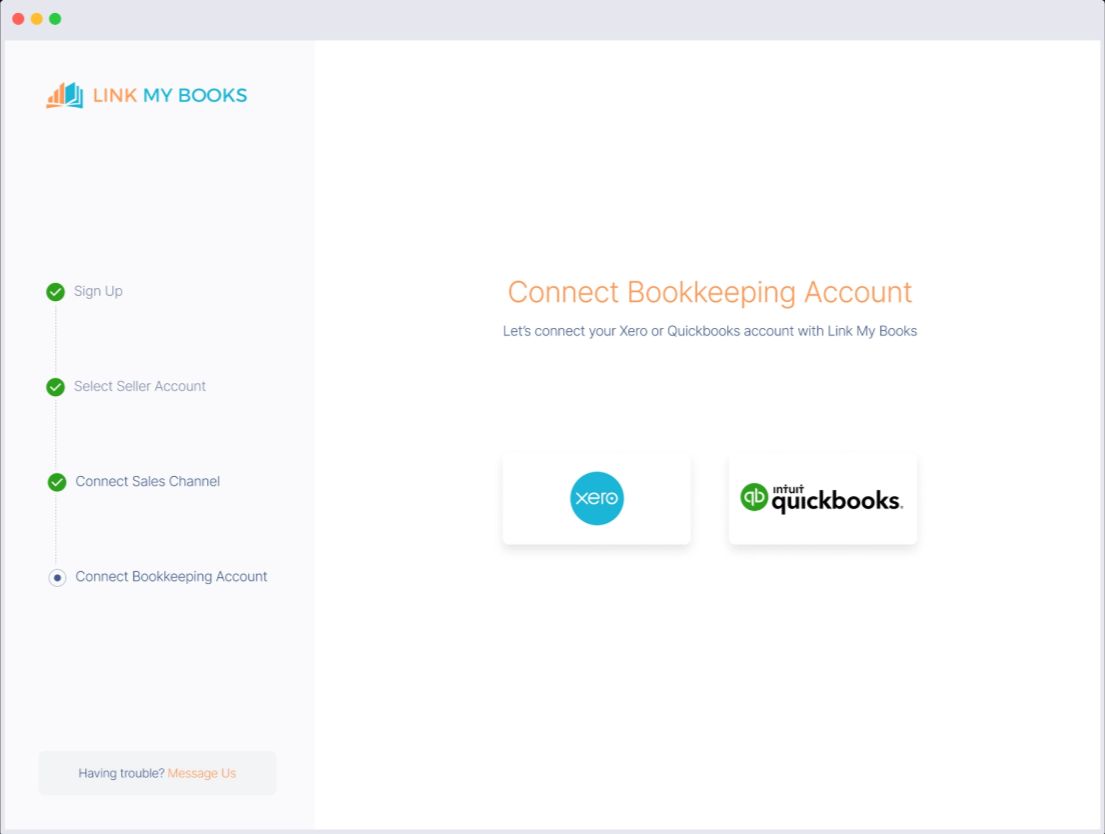
- Selecting a sales channel and connecting the accounting product are separate steps.
- Confirm the exact product edition, region and account eligibility.
- Green checks are part of the supplier example, not evidence of a MailboxCompare account connection.
Screenshots supplied by Link My Books; complete supplier examples captured using the browser screenshot API. Visible example controls are image content and cannot operate an account.
The supplier example offers Xero and QuickBooks at the bookkeeping-account step. Check the exact regional edition and channel eligibility; do not buy a second accounting subscription solely because its logo appears here.
Mapping categories is not the same as connecting an account
Review where sales, refunds, reimbursements, fees, taxes and other relevant categories will go in the books. Keep mapping review distinct from tax-rate confirmation. Sample transaction types and account names are not instructions for your own accounting or tax treatment.
Supplier example from a 2023 resource, captured November 4, 2026. Current interface, edition and regional availability are unverified; no customer account was connected or transaction tested.
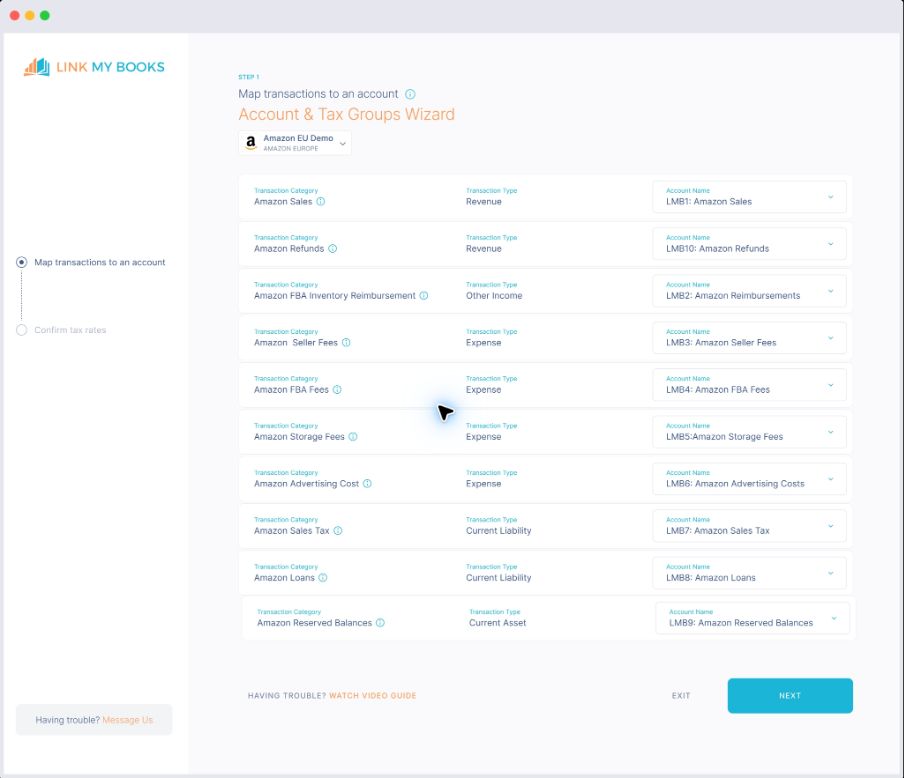
- Review transaction categories and destination accounts.
- Tax-rate confirmation is a separate step.
- A supplier example is not a completed setup for your business.
Screenshots supplied by Link My Books; complete supplier examples captured using the browser screenshot API. Visible example controls are image content and cannot operate an account.
A connection can exist while classification questions remain unresolved. Name the reviewer, record unresolved categories and check a limited example against its underlying source records before relying on repeated automation.
A payout and a profit figure answer different questions
Read the supplier warning: the illustrated payout analysis says product costs are missing, so its figures will not be accurate, and that applicable VAT is excluded. Sample profit, margin and ROI are not typical results or independently verified financial output.
Supplier example from a 2023 resource, captured November 4, 2026. Current interface, edition and regional availability are unverified; no customer account was connected or transaction tested.
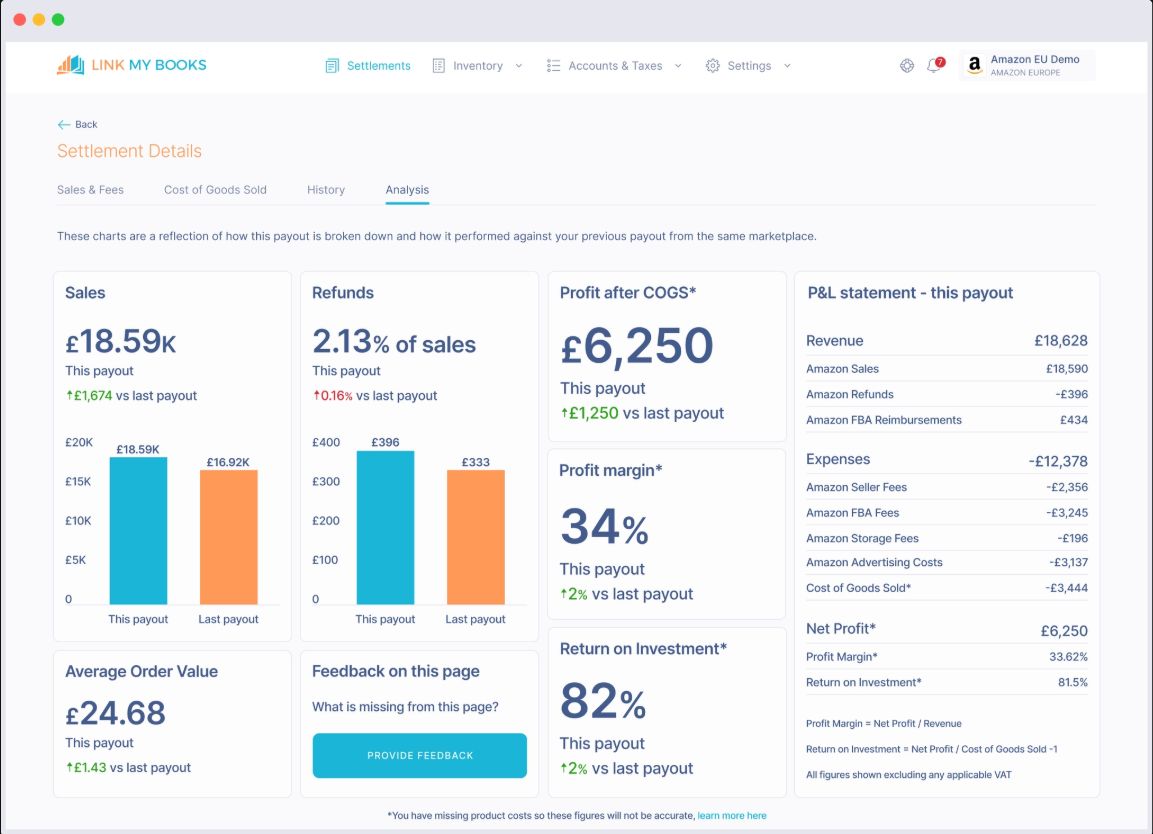
- Sales, refunds and expenses are different charges.
- Compare the payout with its underlying records.
- Missing product costs can distort profit figures.
Screenshots supplied by Link My Books; complete supplier examples captured using the browser screenshot API. Visible example controls are image content and cannot operate an account.
A fictional payout review
Assume one currency, one defined settlement period and only the following charges. These are invented amounts, not supplier prices, observed earnings or a complete accounting treatment.
| charge | Illustrative amount |
|---|---|
| Gross sales in the settlement | 1,000 |
| Refunds | −100 |
| Channel fees | −80 |
| Reimbursement | +20 |
| Known payout portion | 840 |
1,000 − 100 − 80 + 20 = 840. If the bank deposit is 820, keep the remaining 20 unresolved until you establish its cause; do not silently rename it a fee or revenue. Timing, reserves, adjustments or other differences need evidence.
The known payout portion is not profit. Product costs, other expenses, tax, currency conversion and any missing settlement charges remain separate. A bank match alone does not validate category mapping or cost completeness.
A private review sheet
- Record the channel, seller account, currency and settlement period using private labels.
- Retain the underlying sales, refund, fee and adjustment records.
- Compare the explained payout with the actual deposit and its date.
- Leave unmatched amounts and unknown categories unresolved with a specific reviewer.
- Check product-cost completeness and tax/currency assumptions separately before relying on profit figures.
This static page collects no entries and sends no records to Link My Books. An adequate existing report-and-review process may be sufficient.
Confirm total cost and records before switching
- Confirm the selected plan, currency, cash due, billing commitment and renewal.
- Include any required accounting subscription, channel/account limits and review work.
- Check how refunds, adjustments, unsupported categories and failed connections are surfaced.
- Establish which records and reports you can obtain before disconnecting channels, removing accounting access or cancelling.
- Keep an independent record of the terms and permissions you accept. No universal retention, bulk-export, refund or post-close access guarantee is established here.
Use the software purchase worksheet to separate subscription cash, commitment and work assumptions. Keep an adequate existing workflow when switching does not resolve a specific unmet need.
Sources, example dates and limits
The Link My Books supplier resource library entries were created in October 2023; the three complete examples were captured November 4, 2026. Their underlying capture dates and current interface equivalence are unverified. The source labels are “Connect Bookkeeping Account,” “Easy setup wizard” and “Payout Analysis.” These are supplier examples, not MailboxCompare customer tests.
Product-role and connection questions use the retained November 4 research of Link My Books connection documentation and supplier materials. Confirm actual channel, country, accounting-product and plan eligibility. No subscription price, coupon, discount or refund promise is published in this guide.